In 1999, Salesforce launched with a cheeky slogan: “No Software.” The logo crossed out the word software in a red circle. It was a bet that browser-based tools would replace installed programs.
In February 2026, the market tried the same trick on SaaS itself. Investors dumped software stocks on fears that AI agents would replace SaaS tools. Traders called it the SaaSpocalypse.
So is SaaS application development still worth the money? Yes, but the rules changed. Your product now has two kinds of users: people, and the AI agents working for them. This guide from the Weavelinx team shows what to build differently, what it costs, and what to skip.
Is SaaS Dead in 2026?
No. AI agents are thinning out weak SaaS products, not killing SaaS. Tools that are just a form on top of a database are at risk. Products that hold important business data, enforce rules and run real workflows are getting more useful, because agents need them.
The fear is real. By 31 March, the SEG SaaS Index was down 25.7% for the year. Microsoft CEO Satya Nadella had predicted SaaS apps would “collapse, right in the agent era.”
But look at what companies actually pay for. Ramp’s spend data shows seat-based contracts still make up 65–75% of software spend. That share barely moved in 12 months.
The real shift is quieter. Gartner predicts 40% of enterprise apps will include task-specific AI agents by the end of 2026. That is up from under 5% in 2025. Buyers will expect agents to work inside and alongside your product.
What Is Agent-Ready SaaS?
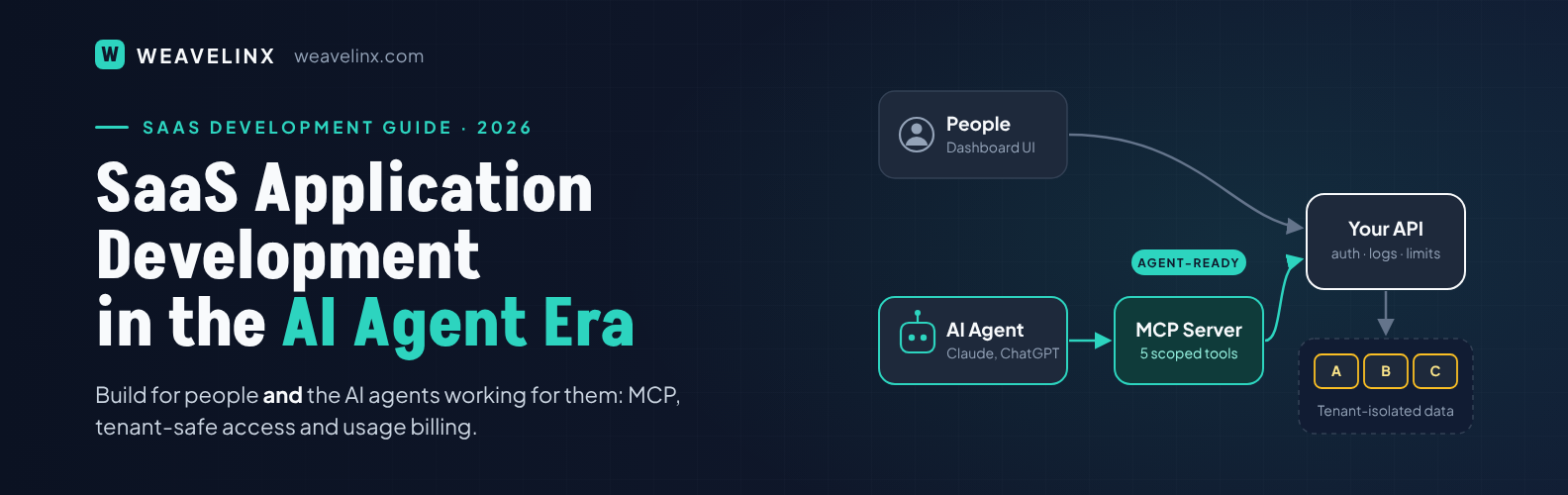
Agent-ready SaaS is a software product that AI agents can safely discover, read from and act on, with the same permissions and audit trail as a human user. People still use the dashboard. Agents use a clean API and a standard connector instead of clicking through screens.
Think of it as a second front door, built for machines. It is clearly labelled with what each action does and who may use it.
What Do AI Agents Need From a SaaS Product?
AI agents need clear actions, scoped access and a record of what they did. They do not need pretty charts.
| Agents need | What that means in your product |
| Clear actions | Well-named API endpoints with plain descriptions, like “list overdue invoices” |
| A standard connector | An MCP server, so Claude, ChatGPT, Copilot and other agents can connect without custom glue |
| Scoped permissions | An agent sees only one customer’s data, and only what its user may see |
| An audit trail | Every agent action logged with who asked, what changed and when |
Model Context Protocol (MCP) is the open standard most agents now use to call outside tools. Its SDKs passed 97 million monthly downloads in March 2026. Yet only 9.4% of 460 tracked SaaS platforms shipped a native MCP server in 2025. For a small SaaS team, that gap is an opening.
SaaS Application Development: A 6-Step Checklist for the Agent Era
Build the normal SaaS foundations first, then add a thin, safe layer for agents
- Start API-first. Every feature your UI uses should go through the same documented API. If an agent cannot do it through the API, it cannot do it at all.
- Lock down tenant isolation. In multi-tenant SaaS, many customers share one system. Enforce the boundary in the database, for example with PostgreSQL row-level security, not only in app code.
- Expose 5 actions through MCP, not 50. Pick the five questions customers ask support most often. Good tool descriptions matter more than tool count.
- Give agents their own scoped tokens. Issue read-only tokens by default. Tie each token to one tenant and one user’s permissions. Our Broker App addon does this for phones: each device pairs by QR code and can be revoked in one click.
- Log and rate-limit agent traffic. Agents can call your API far more often than people. Separate limits and logs keep one busy agent from slowing everyone else. Our Weavelinx Chatbot plugin ships with per-IP rate limits, spend caps and a prompt-injection blocklist.
- Require human approval for risky actions. Refunds, deletes and bulk emails should pause for a person to confirm. Our Property Listing Tool applies the same rule: new listings wait in an approval queue before going live.
Expect agent usage to start small. In one SaaSRise founder discussion, a developer-API business saw under 1% of its traffic arrive through MCP. Most founders built it as a thin wrapper over their existing API, so the cost stayed modest.
What Does an MCP Tool Look Like in Code?
An MCP tool is a small function that wraps one of your existing API calls and describes it in plain words. Here is a read-only tool for an invoicing SaaS, using the official TypeScript SDK.
// invoices-mcp.ts — @modelcontextprotocol/server 2.3.1, zod 4, Node.js 22+
import { McpServer } from '@modelcontextprotocol/server';
import { StdioServerTransport } from '@modelcontextprotocol/server/stdio';
import * as z from 'zod/v4';

const API = process.env.APP_API_URL;           // your existing REST API
const TOKEN = process.env.TENANT_READ_TOKEN;   // read-only, scoped to ONE tenant

const server = new McpServer({ name: 'acme-invoices', version: '1.0.0' });

server.registerTool(
  'list_overdue_invoices',
  {
    // Agents pick tools by reading this description, so write it for a person.
    description: 'List unpaid invoices past their due date for this account. Read-only.',
    inputSchema: z.object({ minDaysOverdue: z.number().int().min(1).default(1) }),
  },
  async ({ minDaysOverdue }) => {
    const url = `${API}/invoices?status=overdue&min_days=${minDaysOverdue}`;
    const res = await fetch(url, { headers: { Authorization: `Bearer ${TOKEN}` } });
    if (!res.ok) throw new Error(`API error ${res.status}`);
    const invoices = await res.json();
    return { content: [{ type: 'text', text: JSON.stringify(invoices) }] };
  },
);

await server.connect(new StdioServerTransport());
Security note: the tool never touches the database. It calls your API with a read-only token for one tenant. Your existing permission checks stay in charge. For hosted, multi-customer use, swap the stdio transport for Streamable HTTP with OAuth, as covered in the SDK docs.
Planning a SaaS product or adding agent access?
We map your workflows, data model, and user roles before writing code, then ship working modules every 2 to 3 weeks.
How Should You Price SaaS When Agents Are the Users?
Use a hybrid model: a base subscription plus a usage or credit component. If one agent does the work of five people, per-seat pricing shrinks your revenue. Pure usage pricing, though, makes bills hard for customers to predict.
As SaaStr’s Jason Lemkin put it, if 10 agents do the work of 100 reps, a company needs 10 seats, not 100.
42% of SaaS products now offer a usage-based option, up from 27% in 2023. Usage-priced companies also keep more revenue, with 108% net revenue retention versus 98% for seat-priced ones.
So build metering in from day one. Count the actions that create value, such as invoices sent or tickets resolved. Even if you launch with simple plans, you can switch on usage pricing later without a rebuild.
Our own add-ons follow this pattern: a monthly or yearly licence, plus usage where it applies. With the Weavelinx Messaging addon, Meta bills WhatsApp template messages at its own rates, with no Weavelinx markup.
What Kind of SaaS Is Still Worth Building?
Build SaaS that agents call, not SaaS that agents replace. A generic note-taking or task app is easy to copy. A product that holds a niche industry’s data, rules and approvals is hard to replace.
Strong bets in 2026:
- Vertical SaaS for one industry, like clinics, brokers or manufacturers, with its real workflows built in.
- Systems of record that own important data, such as inventory, billing or compliance logs.
- Workflow tools with approvals and rules that a general-purpose agent should not guess at.
Our own manufacturing ERP case study shows why. For a 300-person manufacturer, replacing four disconnected spreadsheets with one system cut manual data entry by 70%. Production planning dropped from 5 days to 18 hours. That kind of system is exactly what an agent needs to work against.
Example: Our Real-Estate Product Stack
Our real-estate products show what vertical, modular software looks like in practice. They are WordPress products on monthly or yearly licences, not hosted SaaS, but they follow the same rules. Buyers start with a core tool and add modules as they grow.
| Product | What it does | Agent-era lesson |
| Property Listing Tool | Front-end listing submission, an approval queue, and lead dashboards for users and admins | Own the system of record |
| Weavelinx CRM | Lead statuses, follow-ups and timelines; sales reps see only the leads assigned to them | Scope access by role |
| Lead Connect addon | Pulls leads from 99acres, MagicBricks, Housing.com, Google Ads and Facebook lead ads, merges duplicates and routes them by rules | Accept data from machines, not just forms |
| Weavelinx Messaging addon | WhatsApp chats, templates and opt-in campaigns on each lead page, with consent recorded per lead | Keep a consent and audit trail |
| Broker App addon | Mobile app for leads, property matches and site visits, with devices paired by QR code | Make access revocable |
A general-purpose AI agent cannot guess local portal formats, approval rules or consent records.
How Much Does It Cost and How Long Does It Take?
A focused SaaS MVP with 3–5 core modules usually takes 8–14 weeks. Agent access adds less than most founders expect if your API is clean.
Cost depends on modules, integrations and AI features. For rupee ranges, see our application development cost guide for India. If a ready-made module fits, starting from one on the Weavelinx Marketplace saves build time.
Not sure the idea will sell? Our guide on what an MVP in software development really is shows how to test demand first.
Frequently Asked Questions
Is SaaS dead in 2026?
No. AI agents are hurting simple SaaS tools that only store data behind a form. SaaS products that hold key business data and run real workflows are still growing, because agents need them to get work done.
Do I need an MCP server for my SaaS?
Not on day one, but plan for it. Build API-first now. Then add an MCP server with a few read-only tools when customers start using AI agents. It is usually a small layer on top of your existing API.
How much does it cost to build an AI-ready SaaS in India?
It depends on modules, integrations and AI features. A focused 3–5 module MVP typically takes 8–14 weeks. Making it agent-ready adds a modest layer if your API is clean. Get a scoped estimate before you commit.
Can I add AI agent access to an existing SaaS product?
Yes. Start with your existing API. Wrap your most common read-only actions as MCP tools, issue scoped tokens per tenant, and log every agent call. Add write actions only with human approval.
Should I use usage-based or per-seat pricing?
Most SaaS teams now choose a hybrid. Keep a base subscription for predictable bills, then add usage or credits for agent-driven work. Build metering early so you can change pricing without rebuilding.
Build for People and Agents
The 1999 “No Software” campaign did not end software. It changed how software was delivered. The SaaSpocalypse will not end SaaS either. It changes who your users are.
Build a clean API. Isolate every tenant. Give agents a small, safe door. Price for the work done. Do that, and AI agents become a reason customers stay.
Want agents working inside your product, too?
Our team builds AI agents that connect to your CRM, ERP, or database, not stand-alone chatbots.