The first website ever built is still online. No database. No plugins. No CMS. It loads in a blink, more than thirty years later.
That page is static. Your bank’s login screen is dynamic. Understanding the difference between a static website and a dynamic website decides what your site costs, how fast it loads, and who can update it.
Most guides answer this like a school exam. This one answers it like a budget decision. At Weavelinx we build both, so we will be straight about the trade-offs.
What Is the Difference Between a Static Website and a Dynamic Website?
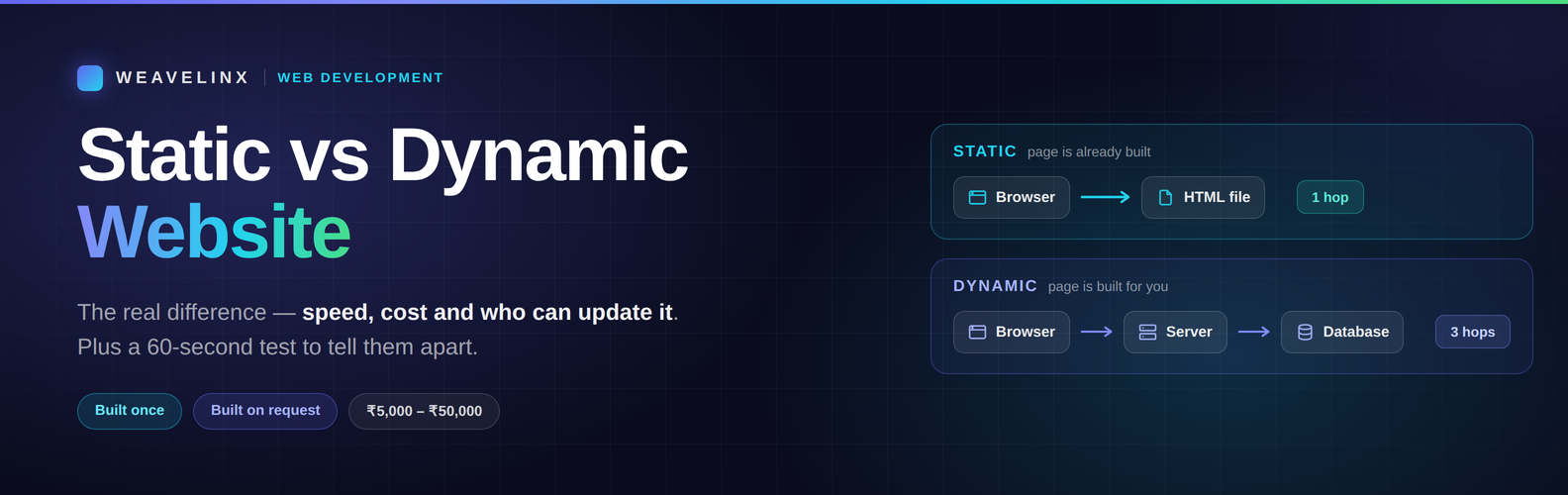
A static website sends pre-built files to every visitor, exactly as they are stored. A dynamic website builds each page when it is requested, usually by pulling content from a database.
MDN Web Docs puts it simply. A static server sends its files “as-is.” A dynamic server adds an application and a database. It updates the page before sending it.
Here is the practical comparison:
| Factor | Static website | Dynamic website |
| How the page is built | Built once, before anyone visits | Built fresh on each request |
| Speed | Very fast — no processing | Depends on server and caching |
| Build cost (India) | ₹5,000 – ₹15,000 | ₹15,000 – ₹50,000 |
| Hosting cost | Often free | ₹1,500 – ₹15,000 per year |
| Who can update it | A developer, or a simple editor | Anyone, through a CMS |
| Security surface | Very small | Plugins, database, logins |
| Personalisation | Same page for everyone | Different page per user |
| Best for | Brochure sites, portfolios, landing pages | Blogs, stores, portals, dashboards |
What Is a Static Website?
A static website is a set of files sitting on a server. When someone visits, the server hands over the file. Nothing is calculated or looked up.
Think of a printed book on a shelf. Every reader gets the same copy.
Static sites suit brochure sites, portfolios, landing pages, event pages and documentation — anything where every visitor should see the same thing.
Static Does Not Mean Boring
This is the biggest misunderstanding, and even the top-ranking guide has to correct it.
A static website can have animations, hover effects, image sliders, filters and calculators. All of that runs in the visitor’s browser, not on a server. The site is still static.
You can also add features people assume need a database:
- Contact forms through a form service
- Site search through a search tool
- A shopping cart through an embeddable checkout
- Comments through a third-party widget
The line is simpler than it looks. If the server has to think before answering, the site is dynamic. If it just hands over a file, it is static.
What Is a Dynamic Website?
A dynamic website stores content in a database and assembles pages on demand. Server-side code — PHP, Node.js, Python — fills a template and sends the result.
Think of a book printed to order, personalised for you, then thrown away.
Why bother? Scale. As MDN puts it, a site with thousands of pages does not store thousands of files. It stores a few templates and one large database.
Dynamic sites power almost everything you log into: Amazon, Netflix, Instagram, banking portals, learning platforms. They also power most business blogs, because someone needs to publish without touching code.
WordPress is the obvious example. It runs 42.6% of all websites — roughly 522 million sites.
How to Tell If a Website Is Static or Dynamic
You can check any site in under a minute. Four quick tests:
- View the page source. Right-click, then “View page source.” If the text you see on screen is in the code, it was pre-built.
- Turn off JavaScript. Reload the page. If most content survives, the HTML was ready before you arrived.
- Look for an admin login. Try adding /wp-admin or /login to the address. A login screen usually means a CMS behind it.
- Compare two browsers. Open the page logged in and logged out. Different content means the server is deciding what to show you.
Website Audit
Is your current site holding you back?
Send us your link to discover what stack you are running and whether it is costing you speed.
Which Is Better for SEO, Static or Dynamic?
Search for this and you will find guides arguing both sides. Some say static ranks better. Others say dynamic wins. Both are half right.
Google does not rank a category. It ranks pages. What it measures is speed, crawlability and content quality.
Here is what Google’s own documentation says: “Server-side or pre-rendering is still a great idea because it makes your website faster for users and crawlers.”
Googlebot works in three stages — crawl, render, index. Pages that need heavy JavaScript wait in a rendering queue. Pages with ready-made HTML skip that wait.
The data backs it up. Only 48% of sites pass Core Web Vitals on mobile, and just 44% have a good Time to First Byte, per the HTTP Archive Web Almanac. Time to First Byte is exactly what pre-building fixes. By platform the gap widens: only 45% of WordPress sites pass on mobile, while some hosted platforms reach 85%.
The honest answer: static gives you a speed head start. Dynamic gives you scale and easier publishing. Neither ranks by itself. Our guide on how SEO actually works covers what Google really measures.
What Each One Costs in India
Nobody on page one of Google prices this. Here are real 2026 numbers.
| Website type | Build cost | Typical timeline |
| Static site (5–10 pages) | ₹25,000 – ₹45,000 | 4 – 5 weeks |
| Dynamic site with CMS | ₹35,000 – ₹75,000 | 4 – 8 weeks |
| E-commerce store | ₹50,000 – ₹1,50,000 | 6 – 12 weeks |
| Custom web application | ₹75,000 – ₹5,00,000+ | 3 months+ |
Running costs matter more than most people expect:
| Item | Static | Dynamic |
| Hosting | ₹0 – ₹2,000 per year | ₹1,500 – ₹15,000 per year |
| Domain | ₹700 – ₹1,500 per year | ₹700 – ₹1,500 per year |
| Maintenance | Minimal | ₹500 – ₹5,000 per month |
A static site can genuinely cost ₹0 to host. GitHub Pages and Cloudflare Pages both serve real production traffic on free plans. A dynamic site needs a server from day one, and someone to keep it patched.
Where the site lives affects speed as much as how it is built. Our comparison of choosing where to host it covers that side.
Security and Maintenance: The Part Nobody Mentions
A static site has almost nothing to attack. No database. No login. No plugins. A dynamic site has all three. That is the trade-off for its flexibility.
Patchstack recorded 11,334 new WordPress vulnerabilities in 2025, up 42% year on year. 91% came from plugins, not WordPress itself. Nearly half had no fix available at disclosure.
This is not an argument against WordPress. It is an argument for budgeting maintenance. A dynamic site is a commitment, not a delivery.
Static has its own hidden cost: who edits the content. One agency described a small change that had to be repeated across 80 static pages. That single round of edits took a week.
CMS Development
Take full control of your website content
Our CMS team builds site layouts your staff can easily update without breaking the design.
In 2026, It Is Not Either/Or
Here is what most guides miss. The choice is no longer static or dynamic. Modern tools let you decide page by page.
Your About page can be pre-built and instant. Your customer dashboard can be generated live. Same website.
Astro’s documentation makes this the default advice: “Start with the default ‘static’ mode until you are sure that most or all of your pages will be rendered on demand.”
Search behaviour shows the shift. Interest in “static website” now rises alongside Astro (+4,900%), Vite and Cloudflare Pages (+1,800%) — modern build tools, not hand-typed HTML.
The middle ground has a name: a headless CMS with a static front end. Your team edits content in a normal dashboard. The site rebuilds itself and serves fast, pre-made pages. CMS convenience, static speed.
And if you pick wrong, you are not stuck. Sites move between the two regularly.
Which Should You Choose?
Three simple tiers:
| Choose | If you |
| Static | Have under 30 pages, update rarely, and want the cheapest fast site |
| Headless CMS + static | Update often but do not need logins, carts, or user accounts |
| Dynamic | Sell online, need user accounts, or publish weekly |
A useful test: how often does your content change, and do visitors need accounts? Rarely, and no? Static. Weekly, or yes? Dynamic.
We built DeskBilling, our own billing software, the same way — start with what the job needs, add complexity only when it earns its place.
FAQs
Is WordPress a static or dynamic website?
WordPress is dynamic by default. It stores content in a database and builds pages on request. It can be made faster with caching, exported as static files, or run headless behind a static front end.
Is Netflix a static or dynamic website?
Dynamic. Netflix shows different titles to every viewer based on watch history and location. That personalisation requires a server deciding what to display.
What are examples of static websites?
Company brochure sites, personal portfolios, campaign landing pages, event pages, documentation sites, and restaurant menus. Anything where every visitor should see the same content.
Can a static website have a contact form?
Yes. Form services handle submissions without a database on your side. The same applies to search, comments, and even a shopping cart.
Which is cheaper, a static or dynamic website?
Static, on both counts. In India a static site typically costs ₹5,000 to ₹15,000 to build and can be hosted free. A dynamic site starts near ₹15,000 and needs paid hosting plus ongoing maintenance.
Not Sure Which One Your Business Needs?
It comes down to three questions: how often your content changes, whether visitors log in, and what you can afford to maintain.
We will ask you those questions honestly — and tell you if a ₹10,000 static site does the job better than a ₹50,000 dynamic one.
Talk to us about your website and we will recommend the right build, not the biggest one.