Weavelinx

redux vs context API
Blog

Redux vs Context API: What Your React App Needs in 2026

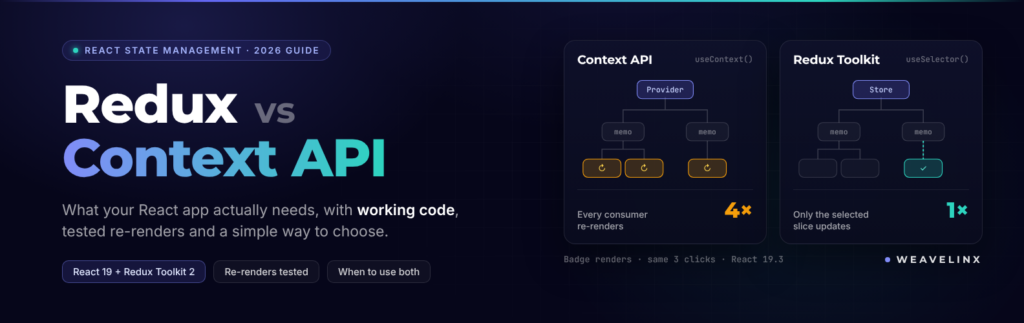
Redux started as a demo. In 2015, Dan Abramov built it for a conference talk about hot reloading and time-travel debugging. A year later, he wrote a post called You Might Not Need Redux. So the debate is almost as old as Redux itself. Most guides on Redux vs Context API still say the same thing: Context for small apps, Redux for big ones. That rule is too simple. Some top-ranking pages even get the reason backwards. This guide gives you the real difference, working 2026 code and a simple way to choose. It comes from a team that builds React dashboards for a living. Redux vs Context API: Which Should You Use? Use Context API to pass data that rarely changes, like theme, language or the logged-in user. Use Redux Toolkit when many components read and update the same state often. Context moves data down the component tree. Redux manages how that data changes. Many production apps use both. What Is the Context API in React? The Context API is a built-in React feature that passes a value to deeply nested components. You skip passing props through every level. You create a context, wrap your app in it, and read it with the useContext hook. It solves a problem called prop drilling. Without Context, a value at the top must pass through every component in between. That gets messy fast. Context shipped in its current form in React 16.3, in March 2018. It costs nothing to add, because it is part of React. What Is Redux, and What Is Redux Toolkit? Redux is a library that keeps your app’s shared state in one central store and changes it only through actions. Every change is a plain object describing what happened. A reducer function decides how the state updates. Redux Toolkit (RTK) is the official, modern way to write Redux. It cuts most of the setup code that gave Redux its “boilerplate” reputation. The Redux team now says any new Redux code should use Redux Toolkit. They describe the old core-only style as obsolete. So when this article says “Redux,” read it as “Redux Toolkit.” Nobody should start a project with 2016-style Redux today. Is Context API a State Management Tool? No. Context is a way to deliver a value, not a way to manage it. It stores nothing on its own. The state still lives in useState or useReducer, and Context passes it down. Redux maintainer Mark Erikson makes this point in his widely shared post on why Context is not a state management tool. He describes Context as “a form of Dependency Injection.” Here is a simple way to picture it. Context is the delivery pipe. useReducer or Redux is the warehouse. You can pair Context with useReducer to get something that looks like Redux. But it does not behave like Redux, as you will see below. What Is the Difference Between Redux and Context API? Context only passes a value. Redux manages state changes and lets each component subscribe to just the data it needs. That second part decides performance as your app grows. Context API Redux Toolkit What it is Built-in value delivery State management library Install Nothing, part of React @reduxjs/toolkit + react-redux Setup A few lines A store and slices Who re-renders on a change Every component that reads the context Only components whose selected data changed Debugging React DevTools Redux DevTools, with action history and time travel Async logic and middleware Write your own Built in (thunks, listeners, RTK Query) Works outside React No Yes Best for Theme, language, auth user, feature flags Large shared state that changes often What Do Redux and Context API Look Like in Code? Both use a provider at the top and a hook in the component. Redux Toolkit adds a store and lets components select a slice of it. Here is the same counter built both ways, on React 19 and Redux Toolkit 2. The Context version This follows the pattern in React’s own docs: one context for the state, one for the dispatch function. The Redux Toolkit version Watch out for old tutorials. If a guide uses createStore or connect(), it is out of date. React-Redux officially deprecated connect in May 2026 in favour of hooks. Is Context API Faster Than Redux? No. Neither is faster by default, but Context re-renders every component that reads it whenever its value changes. Redux re-renders only the components whose selected data actually changed. Some popular articles claim the opposite. They are wrong. We tested this ourselves on React 19.3 and Redux Toolkit 2.13. We built a small “user badge” that only shows a name. Then we changed an unrelated counter three times. For a theme toggle, this does not matter. For a live dashboard with fifty widgets, it matters a lot. Check your own app with the React DevTools Profiler. Does React Compiler Fix Context Re-renders? Partly. React Compiler cuts wasted child re-renders. But every component that reads a context still re-renders when it changes. The compiler hit its stable 1.0 release in October 2025. It memoizes components automatically at build time. It makes Context apps cheaper to run. It does not give Context the per-field subscriptions that Redux has. So treat it as a helpful boost, not a reason to drop selectors. How Do You Stop Context From Re-rendering Everything? Split large contexts into smaller ones, keep state and dispatch in separate contexts, and memoize object values. That fixes most problems before you need a library. If you are still fighting re-renders after all that, it is time for a store. React Development Is your React app slowing down as it grows? Our React developers profile the re-renders, fix the state structure and ship the change. Profiles in 48 hours. Hire a React developer When Should You Use Context API? Use Context API for values that many components read but rarely change. It is the right default when you only need to avoid prop drilling. Good fits

native app vs hybrid app
Blog

Native App vs Hybrid App: How to Actually Choose in 2026

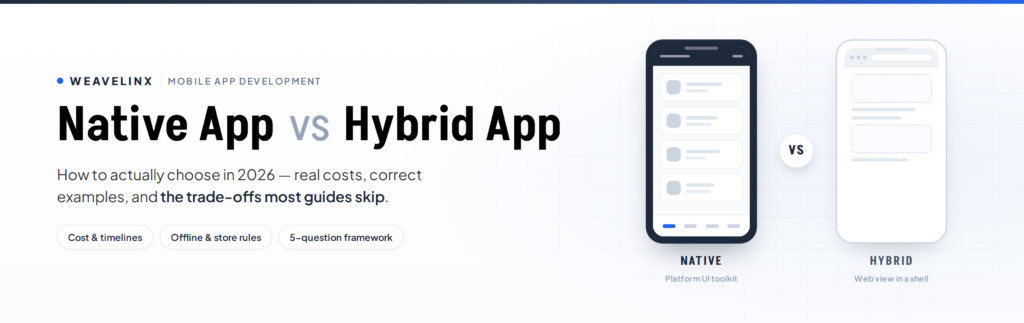
In 2012, Mark Zuckerberg said Facebook’s biggest mistake was betting too much on HTML5 rather than native. He said the company burned two years on it. Fourteen years later, the argument is still running. And it just moved again. This guide covers native app vs hybrid app without the sales pitch. Real definitions, real examples, real costs. One thing up front, because almost nobody says it: Weavelinx builds hybrid and cross-platform apps. That is where most business apps belong. So we will also tell you when yours does not, and when native is the right call. Native App vs Hybrid App: The Short Answer A native app is built separately for each platform using that platform’s own tools. Swift for iOS, Kotlin for Android. A hybrid app wraps a web app inside a native shell, so one codebase runs on both. Native gives you the best performance and platform feel. Hybrid gives you lower cost and faster launch. Here is how they compare, dimension by dimension. What matters Native wins Hybrid wins Raw performance ✅ Platform look and feel ✅ Deep hardware access ✅ Build cost ✅ Time to launch ✅ One team instead of two ✅ Updating both apps at once ✅ Neither one is winning the market. Native apps held about 52.3% of mobile app development revenue in 2025, according to SNS Insider’s market estimate. Hybrid is the fastest-growing segment at roughly 18.2% a year. Both are healthy. The question is which fits your app. “Hybrid App” Gets Used for Four Different Things This is where most articles fall apart. The word “hybrid” gets used for four technologies that work nothing alike. Approach How the screen is drawn What gets shared What that means Native (Swift, Kotlin) The platform’s own UI toolkit Nothing. Two separate apps Highest ceiling on speed and polish, highest cost Capacitor / Ionic The phone’s built-in browser view Everything, including your web code True hybrid. Lowest cost, fastest to launch React Native (usually via Expo) Real native views, driven by JavaScript UI and logic Looks native, because it is native UI Flutter Its own rendering engine UI and logic Identical pixels on both platforms Kotlin Multiplatform Native UI, shared business logic Logic only Native feel, one logic layer Cordova, the older WebView runtime, is now legacy. Capacitor has replaced it for new builds. And most new React Native projects start with Expo, which React Native’s own documentation now recommends. Read the React Native row again. React Native does not run inside a browser. It renders genuine iOS and Android components. Amazon’s own explainer gets this right. AWS defines hybrid apps as native applications with a web browser embedded inside them. Ionic, who build the leading hybrid runtime, say the same thing. By that definition, React Native and Flutter are not hybrid at all. They are cross-platform. Different thing. What hybrid and cross-platform have in common is the part that matters for your budget: shared code. Write a feature once and it ships on iOS and Android. Hybrid goes one step further, because it can reuse code from your existing web app too. That is why it is usually the cheapest route to both stores. Native App Examples and Hybrid App Examples (Most Lists Are Wrong) Search this topic and you will find example lists that contradict each other. One popular guide calls Instagram native. Another calls it hybrid. Same search results page. It gets worse. Several articles list Airbnb as a hybrid app. Airbnb publicly stopped using React Native in June 2018 and explained why in detail. That is eight-year-old news being repeated as current fact. So here is a more careful version. Native: WhatsApp, Spotify, Google Maps, Gmail. Yes, WhatsApp is a native app. Cross-platform, and openly documented as such: Discord and Bloomberg run on React Native. Shopify’s apps did too, until Shopify announced a move back to native in September 2026. Hybrid, in a WebView: mostly internal tools, event apps, catalogues and content apps. Few are household names, which is the honest answer to “name a famous hybrid app.” Our own Broker App, built in Ionic, sits in this category. One warning about every list like this, including ours. Big apps change quietly, and a single screen can use a different technology from the rest. Treat any example list as a snapshot, not a fact of nature. One honest note on that Airbnb story. Their “failed” React Native project ran to 80,000 lines of code across 220 screens. And when they surveyed their own engineers at shutdown, 74% said they would still consider React Native for new projects. The case study everyone cites as proof cross-platform fails has that footnote inside it. What Changed in 2026: Shopify Moved Back to Native This is the newest development in the native app vs hybrid app debate. On 10 September 2026, Shopify published Native is now the future of mobile at Shopify. They are moving their apps from React Native back to Swift and Kotlin. Their reason is not performance. It is AI. In their words, agents now handle enough of the implementation, translation, testing and review work. Building twice is no longer the deciding factor it was in 2020. The numbers are striking. Shopify rebuilt the Shop app natively in 12 weeks, from proof of concept to App Store. Their merchant app runs to 300+ screens, plus widgets, an Apple Watch app and Siri Shortcuts. Now the parts that did not make the headlines. Shopify still calls React Native “an excellent framework” that served them well for six years. But they are stepping back from it. FlashList, a React Native library with around 2 million weekly downloads, gets critical fixes while Shopify looks for a new long-term steward. React Native Skia will be forked by its original creator. Restyle is being archived. And developers reacting to the news made a sharper point. Shopify took more than five years to migrate to React Native, and they still use WebViews inside their apps for some

local seo services for small businesses
Blog

Local SEO Services for Small Business: Costs & What You Get

You do good work. Your customers say so. But when someone nearby searches for what you offer, the shop three streets away gets the call. That gap is what local SEO services for small business are meant to close. The hard part is knowing what you’re paying for. Some agencies charge ₹18,000 a month, some charge $3,000, and some promise “#1 on Google Maps” for ₹5,000. This guide covers what a local SEO service actually includes, what it costs in India, what you can do yourself this week, and how to spot an agency that will waste your money. At Weavelinx we build websites and do SEO, so we’ll also be clear about where your website fits in. New to the topic? Start with our beginner’s guide to local SEO, then come back here. What Local SEO Services for Small Business Actually Include A proper local SEO service is more than “fixing your Google listing.” It usually covers seven things: Service What it means in plain words Google Business Profile setup The right category, services, hours, photos and description Service and location pages One page on your website for each service you sell Citations Matching name, address and phone on Justdial, Sulekha, IndiaMART and others Review system A steady, policy-safe way to ask every customer for a review Schema markup Code that tells Google your address, hours and FAQs Website speed A fast, mobile-friendly site, since most local searches happen on phones Tracking Counting calls, direction requests and WhatsApp enquiries If a quote covers only the first row, you’re buying a listing tidy-up, not local SEO. How Google Decides Who Shows Up on Maps Google says local results depend on three things: relevance, distance and prominence. It is also blunt about one point: “There’s no way to request or pay for a better local ranking on Google.” Experts get more specific. In Whitespark’s 2026 Local Search Ranking Factors, 47 local SEO specialists ranked these as the top map pack signals: That last one is new, and it explains a common complaint: “I show up some days and vanish on others.” If your hours say closed on Sunday, you can lose Sunday searches. Distance plays a part too. Since Google’s 2021 Vicinity update, map results have zoomed in closer to the searcher. For regular search results, the top factor is simpler: a dedicated page for each service you offer. What Changed in Local SEO in 2026 Most guides still read like 2023. Four changes matter now: The good news is that nothing here needs a separate “AI SEO” package. The same basics win Maps, search and AI answers: a complete profile, real reviews and a clear website. Can You Do Local SEO Yourself? Yes, and you should start before paying anyone. Set aside two hours this week for these six steps: Then check your listings on Justdial and Sulekha. Your name, address and phone should match your Google profile exactly. Our list of free SEO tools can help you track progress. How Much Do Local SEO Services Cost in India? Few providers publish their prices, and the ranges are wide. Here’s what we found in September 2026: Option Typical cost Best for DIY ₹0 and 3–5 hours a week Single location, tight budget Freelancer Varies widely Profile and citations only Indian agency ₹18,000–₹65,000/month* Multiple services or locations One-time audit ₹15,000–₹40,000* Finding out what’s broken first US agency $750–$3,000+/month For comparison only *Published packages from one Indian agency. US figures come from WebFX’s public pricing and small business owners on Reddit. Two things to expect from any serious provider: Red Flags When Hiring a Local SEO Agency Small business forums are full of stories about paying for months and ending up with nothing. Watch for these: Google suggests asking any SEO four things: to see examples of past work, whether they follow Google’s guidelines, what results to expect and when, and how you’ll stay in touch. Ask all four before you sign. What Results Look Like, Month by Month Here’s a realistic timeline for a single-location business: When What usually happens Weeks 1–6 Profile fixes and technical repairs. Impressions start to rise. Days 60–90 You start moving up in the map pack. Calls start to pick up. Months 3–6 New service pages start ranking in regular search. Month 6+ Steady visibility, as long as reviews keep coming in. As we say on our SEO page: technical fixes can show impact within weeks, but new content usually takes three to six months to rank. Measure the right things. Track calls, direction requests, WhatsApp messages and form fills. Rankings go up and down every day. Enquiries tell you whether it’s working. Why Your Website Is Half of Local SEO Many small businesses treat their website and their Google profile as separate jobs. Google doesn’t. Your website feeds your local rankings in three ways: This is where a web team makes a difference. We’ve built 10+ headless WordPress sites that score high on Google’s Lighthouse speed tests, and our website development work includes schema and clean URL structure as standard. If you’d like the bigger picture first, read how SEO works. FAQs How much does local SEO cost for a small business? In India, agency packages we found range from ₹18,000 to ₹65,000 a month. One-time audits cost ₹15,000 to ₹40,000. You can do the basics yourself for free. Can I do local SEO myself? Yes. Claim your Google Business Profile, choose the right category, add your services and hours, upload real photos, and ask every customer for a review. Bring in help when your website becomes the bottleneck. How long does local SEO take to work? Profile fixes can show results within weeks. Map pack movement usually takes 60 to 90 days. New website content often takes three to six months to rank. Is local SEO still worth it in 2026? Yes, if your customers come from your own area. AI tools and Google Maps draw on the same signals: your profile, your

static vs dynamic website
Blog

Difference Between Static Website and Dynamic Website

The first website ever built is still online. No database. No plugins. No CMS. It loads in a blink, more than thirty years later. That page is static. Your bank’s login screen is dynamic. Understanding the difference between a static website and a dynamic website decides what your site costs, how fast it loads, and who can update it. Most guides answer this like a school exam. This one answers it like a budget decision. At Weavelinx we build both, so we will be straight about the trade-offs. What Is the Difference Between a Static Website and a Dynamic Website? A static website sends pre-built files to every visitor, exactly as they are stored. A dynamic website builds each page when it is requested, usually by pulling content from a database. MDN Web Docs puts it simply. A static server sends its files “as-is.” A dynamic server adds an application and a database. It updates the page before sending it. Here is the practical comparison: Factor Static website Dynamic website How the page is built Built once, before anyone visits Built fresh on each request Speed Very fast — no processing Depends on server and caching Build cost (India) ₹5,000 – ₹15,000 ₹15,000 – ₹50,000 Hosting cost Often free ₹1,500 – ₹15,000 per year Who can update it A developer, or a simple editor Anyone, through a CMS Security surface Very small Plugins, database, logins Personalisation Same page for everyone Different page per user Best for Brochure sites, portfolios, landing pages Blogs, stores, portals, dashboards What Is a Static Website? A static website is a set of files sitting on a server. When someone visits, the server hands over the file. Nothing is calculated or looked up. Think of a printed book on a shelf. Every reader gets the same copy. Static sites suit brochure sites, portfolios, landing pages, event pages and documentation — anything where every visitor should see the same thing. Static Does Not Mean Boring This is the biggest misunderstanding, and even the top-ranking guide has to correct it. A static website can have animations, hover effects, image sliders, filters and calculators. All of that runs in the visitor’s browser, not on a server. The site is still static. You can also add features people assume need a database: The line is simpler than it looks. If the server has to think before answering, the site is dynamic. If it just hands over a file, it is static. What Is a Dynamic Website? A dynamic website stores content in a database and assembles pages on demand. Server-side code — PHP, Node.js, Python — fills a template and sends the result. Think of a book printed to order, personalised for you, then thrown away. Why bother? Scale. As MDN puts it, a site with thousands of pages does not store thousands of files. It stores a few templates and one large database. Dynamic sites power almost everything you log into: Amazon, Netflix, Instagram, banking portals, learning platforms. They also power most business blogs, because someone needs to publish without touching code. WordPress is the obvious example. It runs 42.6% of all websites — roughly 522 million sites. How to Tell If a Website Is Static or Dynamic You can check any site in under a minute. Four quick tests: Website Audit Is your current site holding you back? Send us your link to discover what stack you are running and whether it is costing you speed. Get a Quick Review Which Is Better for SEO, Static or Dynamic? Search for this and you will find guides arguing both sides. Some say static ranks better. Others say dynamic wins. Both are half right. Google does not rank a category. It ranks pages. What it measures is speed, crawlability and content quality. Here is what Google’s own documentation says: “Server-side or pre-rendering is still a great idea because it makes your website faster for users and crawlers.” Googlebot works in three stages — crawl, render, index. Pages that need heavy JavaScript wait in a rendering queue. Pages with ready-made HTML skip that wait. The data backs it up. Only 48% of sites pass Core Web Vitals on mobile, and just 44% have a good Time to First Byte, per the HTTP Archive Web Almanac. Time to First Byte is exactly what pre-building fixes. By platform the gap widens: only 45% of WordPress sites pass on mobile, while some hosted platforms reach 85%. The honest answer: static gives you a speed head start. Dynamic gives you scale and easier publishing. Neither ranks by itself. Our guide on how SEO actually works covers what Google really measures. What Each One Costs in India Nobody on page one of Google prices this. Here are real 2026 numbers. Website type Build cost Typical timeline Static site (5–10 pages) ₹5,000 – ₹15,000 1–2 weeks Dynamic site with CMS ₹15,000 – ₹50,000 3–6 weeks E-commerce store ₹30,000 – ₹1,50,000 6–12 weeks Custom web application ₹50,000 – ₹5,00,000+ 3 months+ Running costs matter more than most people expect: Item Static Dynamic Hosting ₹0 – ₹2,000 per year ₹1,500 – ₹15,000 per year Domain ₹700 – ₹1,500 per year ₹700 – ₹1,500 per year Maintenance Minimal ₹500 – ₹5,000 per month A static site can genuinely cost ₹0 to host. GitHub Pages and Cloudflare Pages both serve real production traffic on free plans. A dynamic site needs a server from day one, and someone to keep it patched. Where the site lives affects speed as much as how it is built. Our comparison of choosing where to host it covers that side. Security and Maintenance: The Part Nobody Mentions A static site has almost nothing to attack. No database. No login. No plugins. A dynamic site has all three. That is the trade-off for its flexibility. Patchstack recorded 11,334 new WordPress vulnerabilities in 2025, up 42% year on year. 91% came from plugins, not WordPress itself. Nearly half had no fix available at disclosure. This is not

ios app development sercices
Blog

iOS App Development Services in Pune: What It Costs

Ask three Pune agencies to quote your iPhone app and you will get three very different numbers. One says ₹80,000. One says ₹6 lakh. One will not give a figure until you sit through a demo. None of them are lying. They are quoting different things, and almost nobody explains the difference. This guide gives real numbers for iOS app development services in Pune. Costs in rupees, honest timelines, and the questions to ask before you sign. Weavelinx is based here, so these are local rates, not a global average. What iOS App Development Services in Pune Include Most agency pages list twenty services. A real iOS build has five parts. Part What actually happens Custom app development Native builds in Swift and SwiftUI, or React Native when one codebase should serve both stores UI/UX design Screens built to Apple’s Human Interface Guidelines, not a website squeezed onto a phone Apple ecosystem work CloudKit for sync, PassKit for Apple Pay, MapKit for location, SiriKit for voice QA and testing Automated tests plus real-device testing, then a TestFlight beta before launch Launch and upkeep App Store submission, store listing, and updates as iOS changes That last one is where budgets break. Plan for 15–25% of your build cost every year to keep the app running. Apps that skip maintenance fail quietly when iOS updates. How Much Does an iOS App Cost in Pune? This is the question Google shows most often on this search, so here is a straight answer. App type Pune price range Typical timeline Simple app, few integrations ₹1.5–₹5 lakh 6–10 weeks Medium app with backend and payments ₹5–₹12 lakh 3–6 months Complex or enterprise app ₹12–₹50 lakh+ 6–12 months If you would rather hire developers than buy a project: Level Hourly Monthly, dedicated Junior ₹800–₹1,500 ₹50,000–₹1,00,000 Mid-level ₹1,500–₹3,500 ₹1,00,000–₹2,50,000 Senior ₹3,500–₹6,000+ ₹2,50,000–₹4,50,000+ Pune rates run roughly 60–70% below Western markets for the same skill. That is the real reason work lands here. What Actually Moves the Number Integrations, not screens. The top answer in a Reddit costing thread put it well: screen count tells you nothing about build time. Payments, live chat, maps and offline sync do. Backend. Ask whether hosting is in the quote. It runs ₹12,000–₹1,60,000 a month depending on how much media you serve. Compliance. Health or payments data means slower, more careful work. Who writes the code. A ₹6,000-an-hour senior and a ₹800-an-hour junior will both finish. Only one leaves you a codebase you can build on. A ₹80,000 quote is not automatically a scam. It usually means a small scope, a solo developer, or a template. Sometimes that is right. Just know which you are buying. Swift, Flutter, React Native or Kotlin? How We Choose Most agencies push whichever stack they staff. We would rather tell you when ours is the wrong call. There are five sane ways to build an iPhone app in 2026. Here is when each one wins. Option Best for Watch out for Native Swift + SwiftUI Camera, augmented reality, health sensors, Apple Watch. First access to new iOS features Two codebases if you also need Android React Native + Expo Teams who already know React. Expo handles builds, app-store submission and over-the-air updates Version upgrades can swallow weeks Flutter Identical UI on both stores. Animation is smooth since the Impeller engine landed Dart is a smaller hiring pool in Pune than JavaScript Kotlin Multiplatform Sharing business logic while each platform keeps real native UI Younger ecosystem. Your team needs Kotlin Ionic / Capacitor Turning an existing web app into a mobile app quickly. Portals, admin panels, content apps It runs in a webview. Heavy animation and 3D struggle What developers actually use. In a June 2026 survey of 404 iOS developers, 68% lead with SwiftUI. Around 37% use or are exploring Flutter, 29% use React Native, and 16% are evaluating Kotlin Multiplatform. Kotlin Multiplatform is no longer experimental. It has been stable since 2023, and Netflix, McDonald’s and Cash App run it in production. It suits teams that want shared logic without giving up a native feel. Capacitor is the quiet money-saver. If you already have a working web app, wrapping it is the fastest route to the App Store. Just be honest about the ceiling. It is a browser in a native shell. The honest trade-off across all five is upkeep. Cross-platform saves money now and moves some of that cost to upgrade time later. We scope this in week one, before anyone writes code. Still deciding how much to build? Start with an MVP and let real users choose the next feature. How to Choose an iOS App Development Company in Pune Search this and you will find dozens of local agencies with near-identical pages. Six questions separate them. That last point is the real local advantage. You can visit the office, meet the developers, sit in a review. Distributed teams work fine. Proximity just shortens every hard conversation. Quote Comparison Comparing Pune Agencies? Bring us your other quotes. We will give you an honest breakdown of where ours sits and what the difference buys you. Talk to Our Team Why One in Four App Submissions Gets Rejected Nobody selling iOS app development services enjoys this statistic. Apple’s 2025 App Store Transparency Report shows 2.09 million rejections from 9.1 million submissions. Roughly one in four. Apple also removed 166,899 apps and shut 193,035 developer accounts. The top reason is not legal or design. It is performance and completeness — crashes, missing information, broken links, placeholder content. Privacy problems come second. Developers on r/iosdev treat a first bounce-back as normal. Some wait 10–15 days for a decision. Others clear review in two. What lowers the risk is dull work. Real-device testing, a complete privacy manifest, a working TestFlight build, and store listing copy written before submission day. We treat review as a milestone with an owner, not a formality. The April 2026 Rule Every App Owner Should Check If your app has not shipped an

sdlc-vs-stlc-banner
Blog

Software Development Life Cycle vs Software Testing Life Cycle

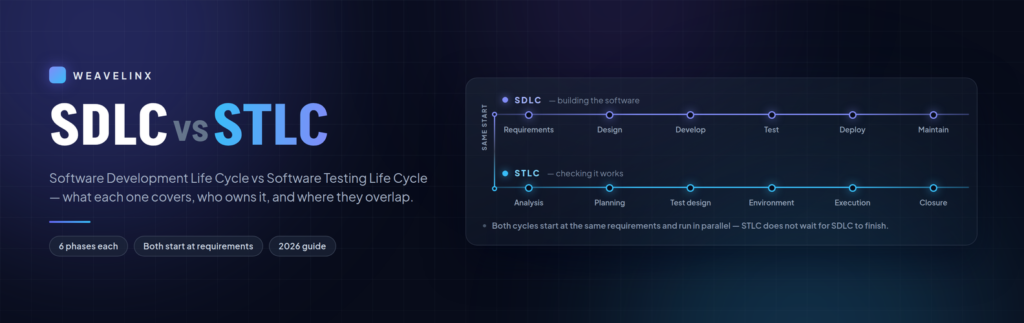
In 1947, engineers on the Harvard Mark II found a moth stuck in a relay. They taped it into the logbook: “First actual case of bug being found.” Sixty-five years later, Knight Capital pushed new code to seven of its eight servers. The eighth kept running old code. In 45 minutes it fired four million trades and lost roughly $460 million. Software breaks. Someone has to catch it first. That is why the software development life cycle vs software testing life cycle question matters. One process builds. The other checks. At Weavelinx, test planning starts in the same meeting as the build plan. Here is where they meet. What Is the Software Development Life Cycle (SDLC)? The SDLC is the full process of building software, from first idea to ongoing support. Most guides list six phases: Each phase produces something you can point at: a requirements document, an architecture diagram, source code, deployment scripts. Testing is only one box out of six. That is where the confusion starts. What Is the Software Testing Life Cycle (STLC)? The STLC is the process a QA team follows to test software properly. It is not a single phase. It is its own cycle running alongside the build: STLC has its own deliverables: a requirement traceability matrix, a test plan, test cases, defect reports, a closure report. Why Every Guide Lists a Different Number of Phases Search this topic and you will find five phases, six, seven and eight. Nobody is lying. Teams split the same work differently. Some break out defect tracking. Some fold reporting into execution. The count does not matter. The activities do. Software Development Life Cycle vs Software Testing Life Cycle: The Real Differences The software development life cycle vs software testing life cycle difference is scope. SDLC covers the whole build — requirements, design, development, testing, deployment and maintenance. STLC covers testing alone — analysis, planning, test design, environment setup, execution and closure. STLC runs inside and alongside SDLC, not after it. Put simply: SDLC asks how do we build this? STLC asks how do we test this? SDLC STLC Scope The whole build Testing activities only Goal Ship working software Find defects before users do Owner Product, BA, design, engineering QA engineers and test leads Starts At requirements At requirements Ends With deployment and maintenance With test closure and sign-off Key outputs BRD, SRS, architecture, code RTM, test plan, test cases, defect reports Measured by Delivery against scope Coverage, defect density, release readiness Look at the Starts row. Both cycles begin at the same point. You will read that STLC “comes after” SDLC. That was true in waterfall. It is not true now. ISTQB is the global testing certification body. Its Foundation Level syllabus is blunt: “Test analysis and design for a given test level begins during the corresponding development phase.” The industry has moved with it. 71.5% of teams now include QA in sprint planning, per the 2026 QA trends report. How SDLC and STLC Overlap in Practice Here is what each side is doing during the same week. SDLC phase Developers Testers Requirements Work out what to build Work out what to test, flag risky areas Design Draw the architecture Draft test scenarios, plan the approach Development Write the code Write test cases, build the test environment Testing Fix what QA reports Run tests, log and track defects Deployment Release the build Run final checks and smoke tests Maintenance Ship patches Regression test so fixes break nothing The old V-Model draws this as a literal V. Requirements pair with acceptance testing, architecture with integration testing, module design with unit testing. This holds whether you build in-house or hire out. Our software development services run QA inside the build. If you are hiring out, our software development outsourcing process guide covers how to keep delivery under control. What It Costs to Skip the Testing Life Cycle A defect gets more expensive the longer it survives. The widely cited cost curve looks like this: Where the bug is found Relative cost Typical fix time Requirements 1x 30 minutes Design 5x 2 hours Development 10x 4 hours Testing 15x 8 hours Production 100x 2–5 days Treat those multipliers as a shape, not a measurement. The underlying data is decades old. The scale is real, though. In 2002, NIST priced inadequate software testing at $59.5 billion a year to the US economy. CISQ later put the cost of poor software quality at $2.41 trillion in 2022. Knight Capital is the version you can picture. A deployment reached seven of eight servers, and no process caught it. That was not a coding failure. It was a release and testing failure — exactly the gap between SDLC and STLC. QA Process Audit Not sure your QA process is doing its job? Send us your setup. We will tell you which STLC phases you are running, which you are missing, and what that gap costs. Get a QA Process Review How This Works in Agile, DevOps and AI-Assisted Teams In waterfall, the two cycles ran back to back. Build everything, then test everything. In Agile they run together, inside each sprint. In DevOps they merge further. 89.1% of teams now run CI/CD, per the same report, so testing can run on every commit. The phases have not disappeared. They are compressed and repeated. What Changes When AI Agents Write the Code This shift makes STLC more important, not less. AI writes code fast. It also writes more problems. CodeRabbit studied 470 open-source pull requests. AI-co-authored PRs carried 10.83 issues each, against 6.45 for human-only — roughly 68% more. Speed alone does not help. DORA research found rising AI adoption lined up with drops in both throughput and stability. The researchers’ read: AI amplifies whatever process you already have. It cuts the other way too. The same QA trends report links GenAI-assisted testing to 31–45% better software quality. The process decides which effect wins. Forrester’s conclusion is the one to remember: testing becomes

software development outsourcing process
Blog

The Software Development Outsourcing Process in 7 Steps

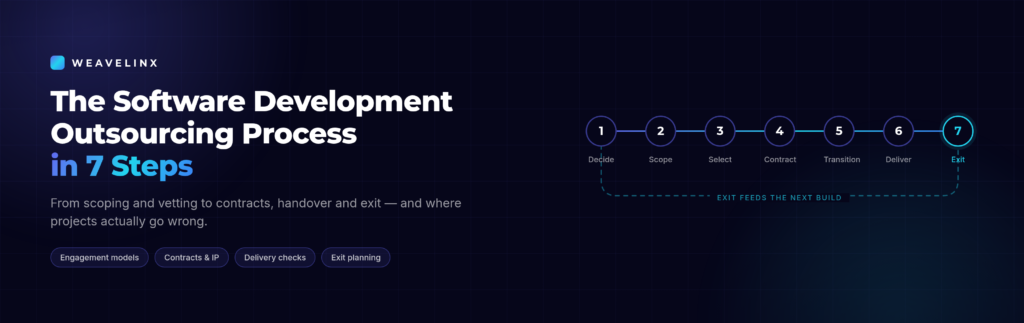
A project billed monthly, with no fixed finish date, has no reason to end. That explains most outsourcing horror stories. Not bad developers. Not distance. Just a contract that pays the same whether work ships in June or December. The software development outsourcing process stops that. It runs from your first decision to the day the engagement ends. At Weavelinx we run it weekly. Here is each step, and where projects go wrong. What Is the Software Development Outsourcing Process? The software development outsourcing process is the sequence a company follows to hand a build to an external team. It covers seven stages: deciding to outsource, defining scope, choosing a model and partner, contracting, transition, delivery management, and exit. Each stage prevents a specific, common failure. The seven steps, in order: Most guides stop at step four. Steps five to seven are where projects are won or quietly lost. Research from ISG finds that 92% of the world’s 2,000 largest companies hold IT outsourcing contracts. Outsourcing Process vs BPO: What’s the Difference? BPO hands over a repeating operation: support desks, payroll, claims processing. Software outsourcing hands over a build, with a scope, a launch date, and a codebase somebody owns afterwards. So the checks differ. A BPO agreement counts tickets closed. A software agreement measures whether the thing works. Step 1: Decide Whether to Outsource at All Start with a readiness check, not a vendor search. Ask three things. Do we know what we want built? Do we have someone who can own delivery? Can we live with a weekly feedback loop, not a daily one? If the last answer is no, think carefully. Products that change direction every few days often move faster in-house. Step 2: Write the Scope Before You Talk to Vendors A widely upvoted comment on r/SaaS put it best: The outsourcing problem is almost always a spec problem disguised as a quality problem. Teams blame quality when the real issue was ambiguity. A usable scope names the workflows, not just the features. List integrations, supported devices, and what “done” means for each item. Write acceptance criteria before the brief. If you cannot describe how you will test something, no team can build it correctly. This is why most first builds should ship as an MVP. Our guide on what an MVP is shows how to cut a roadmap to one workflow. Step 3: Pick the Engagement Model, Then the Partner Choosing the wrong model causes more trouble than the wrong country. Model Best for Watch out for Fixed price Clear, stable scope Every change is a change request Time and materials Evolving requirements Needs close monitoring Dedicated team Ongoing product work Monthly cost, no natural end Staff augmentation You have a lead, not capacity You still manage the work Then vet properly. Founders rush this step. Ask for two client references and call them. Interview the developer who will do the work, not the salesperson. Review shipped projects, not mockups. Any vendor should show real work. Our portfolio of client projects covers 50+ builds, and our outsourcing services page explains each model. Model Advisory Not Sure Which Model Fits? Tell us what you are building. We will recommend the right engagement model and provide a clear, realistic cost breakdown. Get a Straight Assessment Step 4: Get the Contract Right Five documents do the work: the master services agreement, statement of work, service level agreement, NDA, and IP assignment clause. Three specifics matter most. Pay against milestones. Not everything upfront. Not everything on completion. Milestones tie money to working software. Own the repository from day one. The code lives in your GitHub or GitLab organisation. The vendor gets access. This rule prevents the most common handover disaster. Get IP assignment in writing. A verbal assurance is not a transfer. The AI Questions to Ask in 2026 AI is now a contract issue, not a talking point. Law firm Morgan Lewis notes that outsourcing agreements must now cover AI governance, human review, and ownership of AI output. Roughly 44% of IT contracts already include AI components, per Auxis. So ask two questions. Where does AI sit in your process? Who reviews what it produces? Step 5: Run the First 30 Days Properly Almost every guide skips this stage. It is where momentum is made or lost. Agree four hours of overlap time. That removes most time-zone friction. Then set a rhythm and hold it. A daily written update. One weekly call. Direct access to developers, not a manager relaying messages. Name one person on your side who owns delivery. Contractor standards mirror the people managing them. Then ship something small in week one. A tiny deployed change tells you more than four weeks of planning docs. Step 6: Manage Delivery With Real Checks Status reports are not evidence. Build checks that do not rely on trust. Now back to the billing problem from the opening. Flat monthly billing with no delivery target rewards slowness. Tie payments to accepted milestones instead. The market is moving this way. Auxis reports that by 2029, an estimated 30% of IT contracts will be outcome-based — priced on results, not hours. Our piece on lean software development covers the limits that stop a six-week build becoming a six-month one. Project Audit Already Mid-Project and Worried? If a build is drifting, a quick review reveals the cause. We analyze the code, scope, and contract to give you clear answers. Book a Project Review Step 7: Plan the Exit Before You Need It Write the exit plan into the original contract, while goodwill is high. Name four things: repository access, deployment docs, admin credentials, and a fixed handover window. Switching costs compound quietly. Once replacing a vendor costs more than tolerating one, you have lost your leverage. An exit clause keeps it. What Does the Outsourcing Process Cost? Rates vary by region. India and South Asia typically run $15–$45 per hour, Eastern Europe $35–$70, US onshore $100 and up. One number rarely appears

what-is-mvp-in-software-development-banner
Blog

What Is MVP in Software Development? A Founder’s Guide

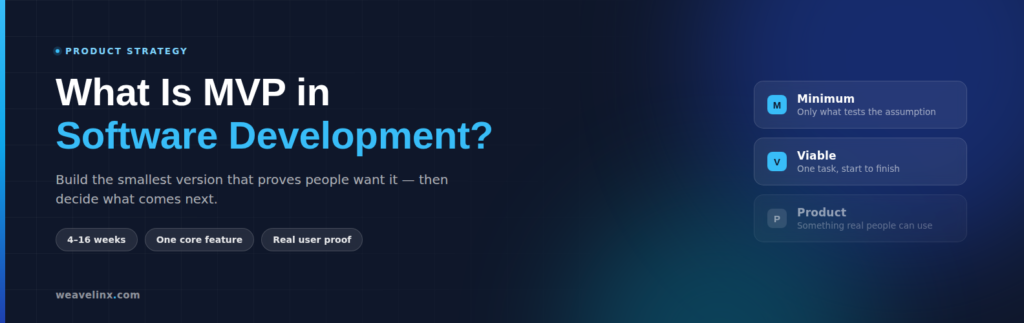
Most failed startups do not run out of code. They run out of customers. CB Insights puts “no market need” as the top reason startups fail, at 42% — ahead of running out of cash. The real question is not can we build this? It is does anyone want it? An MVP answers that. Understanding what is MVP in software development is the difference between a six-week test and a six-month guess. This guide covers what an MVP is, what to cut, what it costs, and how to know if it worked. At Weavelinx, we scope MVPs around one core job and ship fast. What Does MVP Mean in Software Development? MVP stands for Minimum Viable Product. It is the smallest working version of your product that solves one real problem for real users, so you can learn whether the idea is worth building further. Eric Ries popularised the term in The Lean Startup, defining it as the version that collects “the maximum amount of validated learning about customers with the least effort.” He did not coin it, though — Frank Robinson defined MVP in 2001. Plenty of guides get this wrong. Element What it means in practice Minimum Only the features needed to test your main assumption. Viable It actually works. One complete task, start to finish. Product Something real people can use — not a mockup or a slide. That middle word causes the most damage. Minimum does not mean broken. Half a working feature is not an MVP. It is a bug. MVP vs MVC: Not the Same Thing People search for both, so let’s clear it up. MVP is a business idea. MVC is a code pattern. You can build an MVP using MVC. They solve different problems. Where an MVP Fits in the Software Development Lifecycle An MVP is not the first step. Two stages usually come first, each removing a different risk. Stage Question it answers Who sees it Typical time Proof of Concept Can we build this at all? Internal tech team Days to 2 weeks Prototype Does the flow make sense? Stakeholders, testers 1–3 weeks MVP Does anyone actually want it? Real users 4–16 weeks MMP Is it ready to sell widely? The wider market After MVP feedback A proof of concept kills technical risk. A prototype fixes the experience. Only the MVP tests the market. Why Build an MVP First? Because building the wrong thing is the most expensive mistake in software. The research on why startups fail is blunt about the habits behind it: Founders who validate properly cut their failure rate from 42% to under 15%, reach revenue 40% faster, and raise money 2–3x more successfully. Google Trends also shows searches for “minimum viable product” hit a five-year high in May 2026, after four flat years. MVP Scoping Not sure what belongs in version one? Book a free discovery call and we’ll help you cut your feature list down to what actually needs testing. Book a Free Call How to Build an MVP in 6 Steps This is the same waste-cutting logic behind lean software development — build small, learn fast, skip work nobody needed. How Long Does an MVP Take and What Does It Cost? Most MVPs take 4 to 16 weeks: Phase Time Discovery and scoping 1–2 weeks UI/UX prototyping 1–3 weeks Core development 2–8 weeks Testing and launch 1–3 weeks Cost is where founders get confused. Quotes range from $15,000 to $300,000 for what sounds like the same thing. Both numbers are real. MVP type Cost (USD) Cost (INR) Landing page or waitlist test $600 – $2,000 ₹50,000 – ₹1.5 lakh Single-feature MVP $2,400 – $6,000 ₹2 – 5 lakh Standard web or mobile MVP $6,000 – $14,400 ₹5 – 12 lakh Complex or regulated build $14,400 – $30,000+ ₹12 – 25 lakh+ The spread comes down to three things: how many features you include, how many systems you connect to, and where your team sits. A fintech MVP with compliance rules costs far more than a booking tool. Rates in India sit well below US and European rates, which is why outsourcing your build often makes the numbers work. One warning: teams typically underestimate MVP costs by 30–40%. 5 Mistakes That Kill MVPs These come from founders describing real projects, not theory. 1. Feature bloat. One dev shop described a founder with a 47-page requirements document and a $40,000 budget. Asked to name the one core job, he could not. Cut to a single workflow, it launched in 7 weeks instead of 6 months and got 200 signups in week one. 2. Building for users you do not have. The same shop compared two real projects: Approach Cost Time Result Microservices and Kubernetes $120,000 5 months 31 signups, then pivoted Basic Next.js app on Vercel $25,000 6 weeks 500 users month one, still running at 5,000 3. Engineering for its own sake. Founders spend two weeks building custom login when Firebase Authentication takes two hours. Your MVP does not need message queues yet. 4. Shipping an AI prototype as production. A fintech founder built her product entirely with AI tools, got a bank interested, then hired a team to make it production-ready. The quote was 300+ hours — roughly the cost of building it properly from scratch. The server also went live with an open port and a default password. Ransomware wiped it. AI tools are useful for testing an idea in days. They are not a substitute for someone who can read the code you ship. 5. No success criteria. If you did not define “working” before launch, you cannot tell success from noise. Prototype Review Built a prototype with AI and unsure what happens next? Our custom software development team will review it and tell you honestly what needs rebuilding. Book a Free Review How to Know If Your MVP Worked Set these targets before you launch: Metric Consumer product B2B product Activation rate 40%+ 60%+ Week-4 retention 20%+ 60%+ Time to

Scroll to Top