

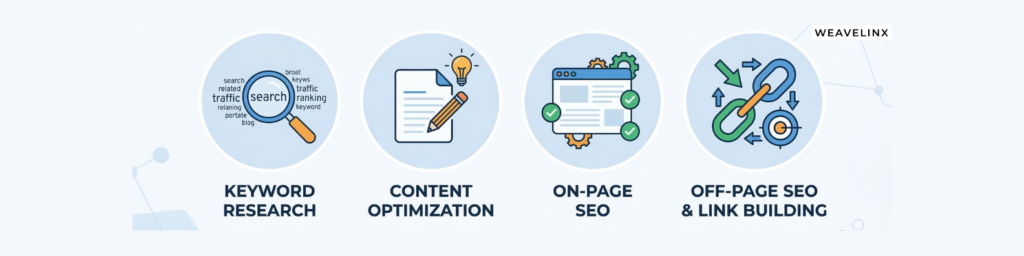
1. Why SEO Tools Matter Today
If you rely only on guesswork, you waste time on content that never ranks. SEO tools give you data on keywords, content quality, technical issues, and backlinks so you can make decisions based on evidence, not intuition.
They help you: content planning with real search demand, fix on‑page issues before publishing, and build links from the right sources instead of random outreach.
2. SEO Content Writing Tools (Plan, Draft, Optimize)
These tools help you research topics, generate drafts, and optimize content for readability and search.
2.1 Keywordly
Keywordly is built for SEO‑focused content briefs and article outlines. It helps you cluster related keywords, plan H2/H3s, and keep keyword density under control while you write.
Use it when you want to build an article outline around a main keyword and secondary phrases without over‑stuffing.
2.2 Writesonic
Writesonic generates AI‑powered blog posts, landing pages, and ad copy with SEO options like meta descriptions and keyword prompts.
It works well for first drafts and ideas, but you should always review, fact‑check, and localize the content before publishing.
2.3 Koala Writer
Koala Writer focuses on long‑form SEO articles: you can feed it a keyword and SERP data, and it will generate an article with headings and FAQs.
It is useful for affiliate posts, listicles, and informational blogs where structure and length matter.
2.4 SEO Review Tools Content Editor
This editor scores your content against your target keyword, checks basic on‑page factors, and helps you adjust headings and keyword placement.
Use it just before publishing to tighten keyword usage and fix thin or over‑optimized sections.
2.5 Frase
Frase analyzes top‑ranking pages for a query and suggests topics, questions, and structure.
It is ideal for building content briefs and ensuring you cover the same intent and subtopics as competitors, without copying them.
2.6 GravityWrite
GravityWrite offers AI templates for blogs, product descriptions, and social posts, with simple SEO prompts.
It fits teams that need fast, short‑form content with basic optimization rather than deep, long‑form strategy.
2.7 Copy.ai
GravityWrite offers AI templates for blogs, product descriptions, and social posts, with simple SEO prompts.
It fits teams that need fast, short‑form content with basic optimization rather than deep, long‑form strategy.
2.8 Rytr
Rytr is a lightweight AI writer that supports many use cases (blogs, emails, social posts) with a simple interface and keyword input.
It’s good for small teams who want a low‑cost AI assistant rather than a full SEO suite.
2.9 TinyWow
TinyWow offers free AI writing utilities: rewriting, summarizing, and quick content generation.
Use it for micro‑tasks like rephrasing, shortening paragraphs, and cleaning up copy.
2.10 HubSpot Free AI Content Writer
HubSpot’s free writer integrates with their CRM and marketing tools, helping you create SEO‑friendly blogs, emails, and web copy inside one ecosystem.
It makes sense if you already use HubSpot for campaigns and want consistent content workflows.
3. Keyword Research Tools (Find Topics That Actually Rank)
These tools help you find keywords, understand demand, and discover new topics before your competitors.
3.1 Gracker.ai
Gracker.ai maps content topics, clusters related keywords, and shows content gaps against competitors.
You can use it to plan entire content silos and see which pages to create first for faster SEO wins.
3.2 Exploding Topics
Exploding Topics shows fast‑growing topics before they become saturated, based on trend data.
Great for catching new niches, emerging tools, or questions and writing content before everyone else.
3.3 Keyword Insight
Keyword Insight clusters thousands of keywords into topics and identifies intent behind them.
This helps you group queries into one strong article instead of creating dozens of thin posts.
3.4 WriterZen
WriterZen bundles keyword research, topic discovery, and content briefs, with features for E‑E‑A‑T‑friendly outlines.
Use it to go from seed keyword to full brief in a single workflow.
3.5 AlsoAsked
AlsoAsked scrapes People Also Ask questions and groups them visually.
It is perfect for FAQ sections, H2/H3 ideas, and understanding how users dig deeper into a topic.
3.6 Ferzy
Ferzy gives keyword difficulty scores, search volumes, and related keyword ideas.
Use it when you want a quick “can I realistically rank for this?” check.
3.8 Keywords Everywhere
Keywords Everywhere is a browser extension that overlays search volume, CPC, and related keywords directly in Google.
It’s ideal for quick research while you’re browsing SERPs, YouTube, or other platforms.
4. On‑Page SEO Tools (Fix Pages Before and After Publishing)
On‑page tools help you optimize titles, meta tags, structure, and overall crawlability.
4.1 Rank Math (Free Version)
Rank Math is a WordPress SEO plugin that manages meta titles, descriptions, sitemaps, schema, and basic on‑page scores.
Use it to control indexation, manage redirects, and get page‑level SEO checklists inside the editor.
4.2 Merkle Schema Markup Generator
Merkle’s generator helps you build JSON‑LD schema (FAQ, Article, Product, LocalBusiness and more) without coding.
You can paste the code into your site to improve rich result eligibility.
4.3 Detailed SEO Extension
The Detailed extension shows meta tags, headings, canonicals, Open Graph tags, and more for any URL in one click.
It’s great for quick audits of your site or competitor pages.
4.4 Google Rich Results Test
This tool checks if your structured data qualifies for rich results and highlights errors.
Run it after adding schema via Rank Math or Merkle to ensure everything validates.
4.5 SEO Review Tools’ Content Editor
Beyond writing, this editor evaluates on‑page optimization: keyword placement, title tags, and content relevance for a given query.
Use it as a final optimization pass before publishing or updating an article.
4.6 Surfer SEO’s Free AI Outline Generator
Surfer’s free outline generator builds H2/H3 structures from SERP data for your keyword.
You can then refine that outline and write manually or combine it with your AI writer of choice.
4.7 Screaming Frog SEO Spider (Free Tier)
Screaming Frog crawls your site to find broken links, duplicate content, missing meta tags, and other technical on‑page issues.
The free tier is enough for small sites and one‑off audits.
4.8 The SEO Framework
The SEO Framework is a lightweight WordPress SEO plugin that automatically generates titles, descriptions, and canonical URLs.
It suits teams who prefer minimal, performance‑friendly plugins over feature‑heavy options.
4.9 MetaTags.io
MetaTags.io lets you preview how your page will look on Google, Facebook, and X (Twitter) with live meta tag previews.
Use it to refine titles and descriptions for higher click‑through rates.
4.10 Animalz Revive
Animalz Revive identifies old blog posts that are decaying in traffic and need updates.
It helps you prioritize refreshes instead of only publishing new content.
5. Off‑Page SEO Tools (Backlinks, PR, and Brand Mentions)
Off‑page tools help you track and earn links, monitor mentions, and analyze competitors’ profiles.
5.1 Ahrefs Free Backlink Checker
Ahrefs’ free checker shows top backlinks, referring domains, and basic anchor text data for any URL or domain.
Use it to benchmark your site’s authority and reverse‑engineer competitors’ link sources.
5.2 Connectively (Free Tier)
Connectively (formerly HARO‑style platform) connects journalists with expert sources.
You can pitch relevant queries and earn high‑authority backlinks and brand mentions.
5.3 Qwoted (Free Tier)
Qwoted is another PR platform for experts and journalists, with profiles, pitches, and topic alerts.
It’s suited for founders and specialists who want to build thought leadership and earn editorial links.
5.4 Hunter.io (Free Plan)
Hunter.io finds and verifies professional email addresses for outreach.
Pair it with your backlink strategy to contact site owners, editors, and journalists with personalized pitches.
5.5 SEO SpyGlass (Free Version)
SEO SpyGlass analyzes backlink profiles, showing toxic links, link types, and new/lost links over time.
Use it to clean up spammy links and understand which domains bring the most value.
5.6 Google Alerts (100% Free)
Google Alerts notifies you when your brand, competitors, or target keywords are mentioned on the web.
You can use this to reclaim unlinked mentions and track PR performance.
5.7 Moz Link Explorer (Free Tier)
Moz Link Explorer provides domain authority, page authority, and backlink data.
It’s helpful for quick competitive checks and prospect quality assessment.
5.8 Talkwalker Alerts (100% Free)
Talkwalker Alerts is a more advanced alerting tool that monitors web and media mentions.
Good for broader brand monitoring beyond basic Google Alerts.
5.9 Snov.io (Free Tier)
Snov.io is an outreach and email automation platform that combines email finding, warming, and campaigns.
You can build, send, and track link‑building campaigns from one dashboard.
5.10 Semrush Backlink Analytics (Free Tier)
Semrush’s backlink analytics show referring domains, anchor text, and historical link data, even in the free tier.
Use it to discover competitor link patterns and new outreach angles.
6. Quick Comparison Table by Use Case
| Category | Tool examples | Best for | Free option? |
|---|---|---|---|
| Keyword research | Gracker.ai, Exploding Topics, KWFinder, Keywords Everywhere Seo-tools-of-the-keyword-research.pdf | Finding topics, clusters, and long‑tail keywords | Yes (various tiers) Seo-tools-of-the-keyword-research.pdf |
| Content writing | Keywordly, Writesonic, Koala Writer, Frase, Copy.ai, Rytr Seo-tools-of-the-keyword-research.pdf+1 | Drafting and optimizing SEO content | Yes (plans/tiers) Seo-tools-of-the-keyword-research.pdf |
| On‑page optimization | Rank Math, Screaming Frog, Merkle Schema, Detailed, SEO Framework Seo-tools-of-the-keyword-research.pdf | Fixing meta tags, structure, and technical issues | Yes (plugins/free tiers) Seo-tools-of-the-keyword-research.pdf |
| Off‑page & link building | Ahrefs Backlink Checker, Connectively, Qwoted, Hunter.io, Moz, Snov.io Seo-tools-of-the-keyword-research.pdf | Backlink analysis, PR, outreach | Yes (limited free) Seo-tools-of-the-keyword-research.pdf |
7. How to Choose the Right SEO Stack
You do not need every tool on this list. Start by matching tools to your current bottleneck: research, writing, on‑page, or links.
For a lean but powerful setup, you could combine: one keyword tool (e.g., KWFinder or Gracker.ai), one content tool (Keywordly or Writesonic), one on‑page plugin (Rank Math plus Screaming Frog for audits), and one backlink tool (Ahrefs Free Checker plus a PR platform like Connectively).